 English
 Svenska
Workflow 1: Chatbot Assistant in Slack
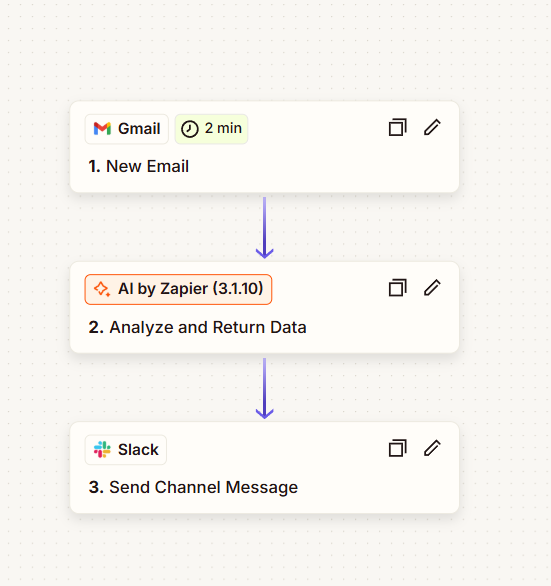
Email → AI → SlackThis workflow starts when a new email arrives. AI summarizes the message and sends a clean update to Slack, reducing inbox overload and keeping the important context visible in real time.
Trigger
New email arrives
Detects email activity as soon as it happens.
AI step
Summarize + highlight
Extracts key info + suggested actions.
Deliver
Send to Slack
Posts a readable update to your channel.
Workflow 2: Slack Q&A Assistant (Sheets + AI)
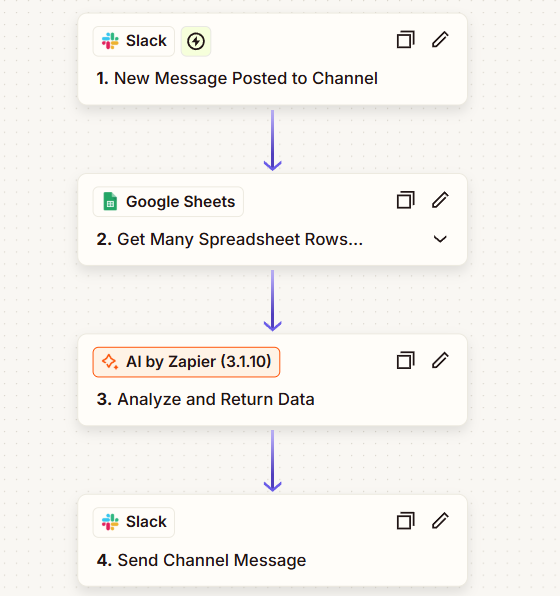
Slack → Sheets → AIA Slack chatbot that listens to questions, searches matching data in Google Sheets, and returns a helpful answer using AI. A hands-free assistant that’s always ready—ideal for internal support and quick lookup tasks.
Listen
Slack message
Triggers on a question in a channel.
Lookup
Google Sheets
Finds relevant row(s) from your data.
Answer
AI response
Summarizes + replies in a human-friendly way.
Key Benefits
- Real-time Slack updates that reduce inbox overload
- AI summaries + action highlights for faster decisions
- A chatbot that answers questions using Sheets as a knowledge base
- No-code setup (perfect for teams without developers)
Tip
Want this connected to your CRM, Notion, or your own knowledge base? We can adapt the workflows to your tools.
Contact us →